

Schedules and Holidays

Block Now is for tonight. So is a pause. So is homework mode. Those are buttons, and they expire by morning. The schedule is the other thing — the quiet background rhythm that decides when screens wind down on a Tuesday, when they can sleep in on a Saturday, and what happens during the two weeks in July when nobody remembers what day it is.
Most products make you rebuild that rhythm as one grid of times, from scratch, every time life changes. We don’t. The schedule is four layers, stacked. You set each one once. The right one takes over on the right day.
The four layers
Section titled “The four layers”| Layer | In plain terms |
|---|---|
| Semaine (Weekdays) | The base rhythm. Homework window after supper, screens winding down before bed, an earlier dodo. This is the layer that runs most of the year, most of the week. |
| Fin de semaine (Weekends) | The looser version. Later bedtime, more room in the day. It takes over automatically on the days you mark as weekend — no Friday-evening ceremony required. |
| Congés (Holidays) | Date ranges you enter ahead of time — the relâche, the summer, a long weekend, a journée pédagogique. While the range is running, the holiday layer replaces the normal week. |
| Études (Study) | The strict one. A temporary layer for Alex’s exam week: tighter evenings, a firmer bedtime. It has a start date and an end date; when the exams end, so does the lockdown. |
Each layer is just a set of times — when the evening ends, when screens are expected to be off. You are not programming anything. You are writing down the week you already run in your head.
Which layer wins
Section titled “Which layer wins”One rule, top to bottom. The most specific layer wins.
- Études beats everything. If Sam’s exam week overlaps a holiday Monday, the study layer runs.
- A Congés range beats the ordinary week. During the relâche, the app does not care that it is technically a school night.
- Semaine and Fin de semaine split the ordinary week between them. Each day belongs to one or the other, so they never fight.
You never have to work this out yourself. On the Horaire screen, the layer in charge wears an En vigueur badge, and the child’s card on the Home screen names the next event coming — “Congés jusqu’au 5 janvier”, “Dodo à 21:30”. If the evening feels wrong, that badge is the first thing to check.
Holiday ranges
Section titled “Holiday ranges”Holidays are the layer parents forget a product can even do. So they hand-edit bedtimes every June and hand-restore them every September. Here it is one entry: a name and a date range.
- La relâche — enter the week once, in February, while the school calendar is still open on the counter.
- Summer — one long range, from the last school day to the first one back.
- Jours fériés and journées pédagogiques — a single-day range is perfectly legal. The Monday of a long weekend can be a holiday all by itself.
When the range starts, the holiday layer takes over on its own. When it ends, the Semaine rhythm comes back on its own. There is no “remember to switch it back.” The end date is the switching back. Études works the same way — it ends because you gave it an end, not because you remembered to release it.
Editing from the app
Section titled “Editing from the app”-
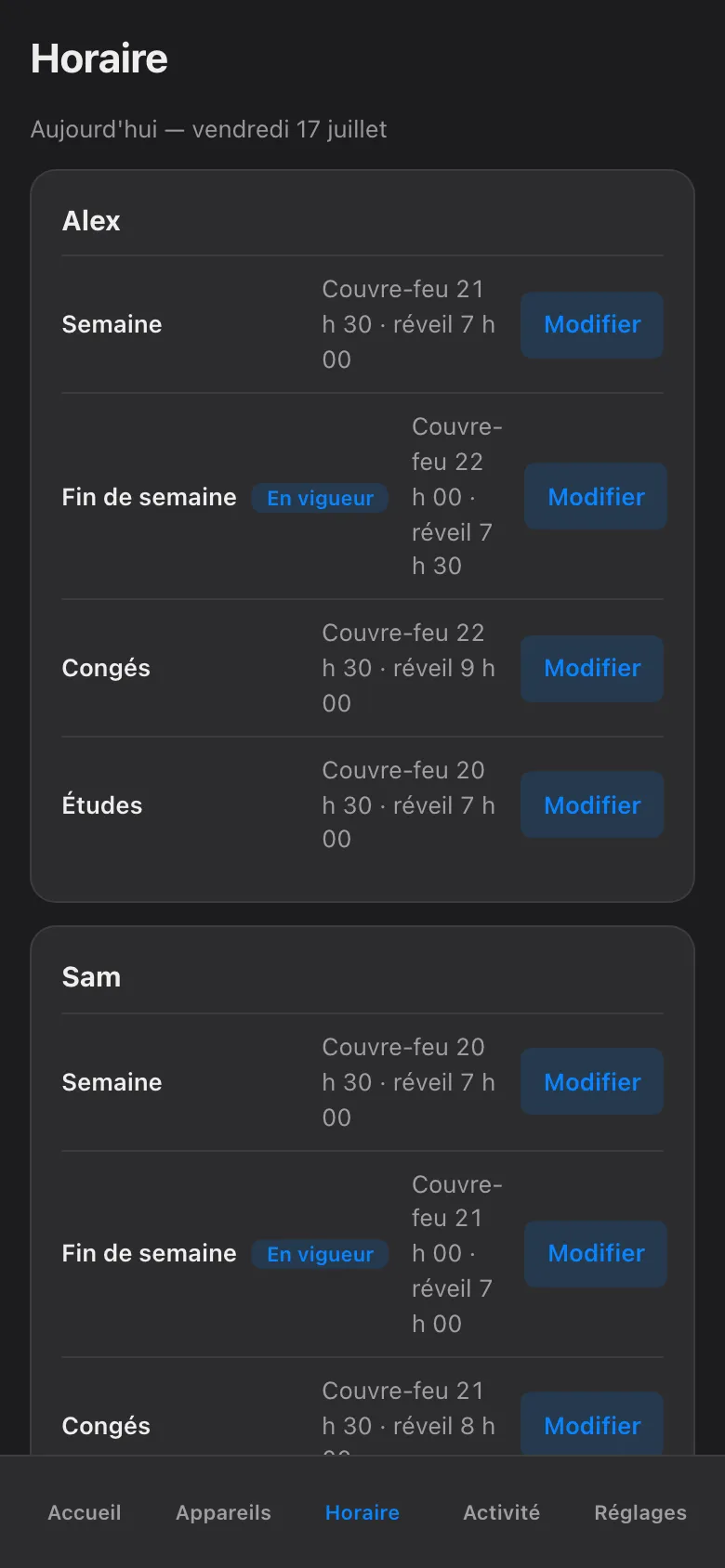
Tap Horaire in the bottom bar. Every child is there, one card each, with the four layers listed as rows — Semaine, Fin de semaine, Congés, Études — and the layer in charge right now wearing the En vigueur badge.
-
Tap Modifier on the row you want to change. For Semaine and Fin de semaine you adjust the couvre-feu and réveil times; for Congés and Études you also set the date range. A layer you have never filled in simply reads “Not set” until you do.
-
Save. The row updates in place — times, badge and all — so you can see immediately that the change reads the way you meant it.
Two honesty notes, the same ones that run through this whole app:
- Enforcement is confirmed, not assumed. When a schedule event fires — the evening cut-off, the exam-week bedtime — the block is confirmed by the network box (the Firewalla). Green means it actually happened. Red means it did not, and the app says so. There is no fake green.
- Every hold names itself. Anything currently limiting a device shows who or what set it — “the schedule”, or a parent by name — and when it ends. Children can disagree with the calendar, but they never have to guess it.
When the schedule is wrong tonight
Section titled “When the schedule is wrong tonight”Do not edit the calendar for a one-evening problem. That is what the buttons are for. A guest, a movie night, a project due tomorrow — reach for Plus de temps (an override, capped at 120 minutes, hard stop) or a pause, which always asks who is pausing and for how long, with jusqu’au réveil as the maximum.
But watch for the tell. If you keep reaching for the same override on the same night every week, that is not an exception any more. That is a weekend layer asking to be edited.
The screenshots show the French phone view, as the haus runs it; in English the rows read Weekdays, Weekends, Holidays, Study, the badge reads Active now, and everything sits in the same places.
The schedule has no opinions about fairness. It keeps no memory of last Tuesday’s argument. It never has to raise its voice at 21:29 — it just quietly outlasts everyone who does.